Want to land a high-paying software engineering job?

Practice the problems you could face in your next interview. Follow your code line by line to understand where it goes wrong, and choose how much help you get from Smart Hints, from a small nudge to an explanation of how to fix your code.

Free to start · No download · Sign in with Google or Apple

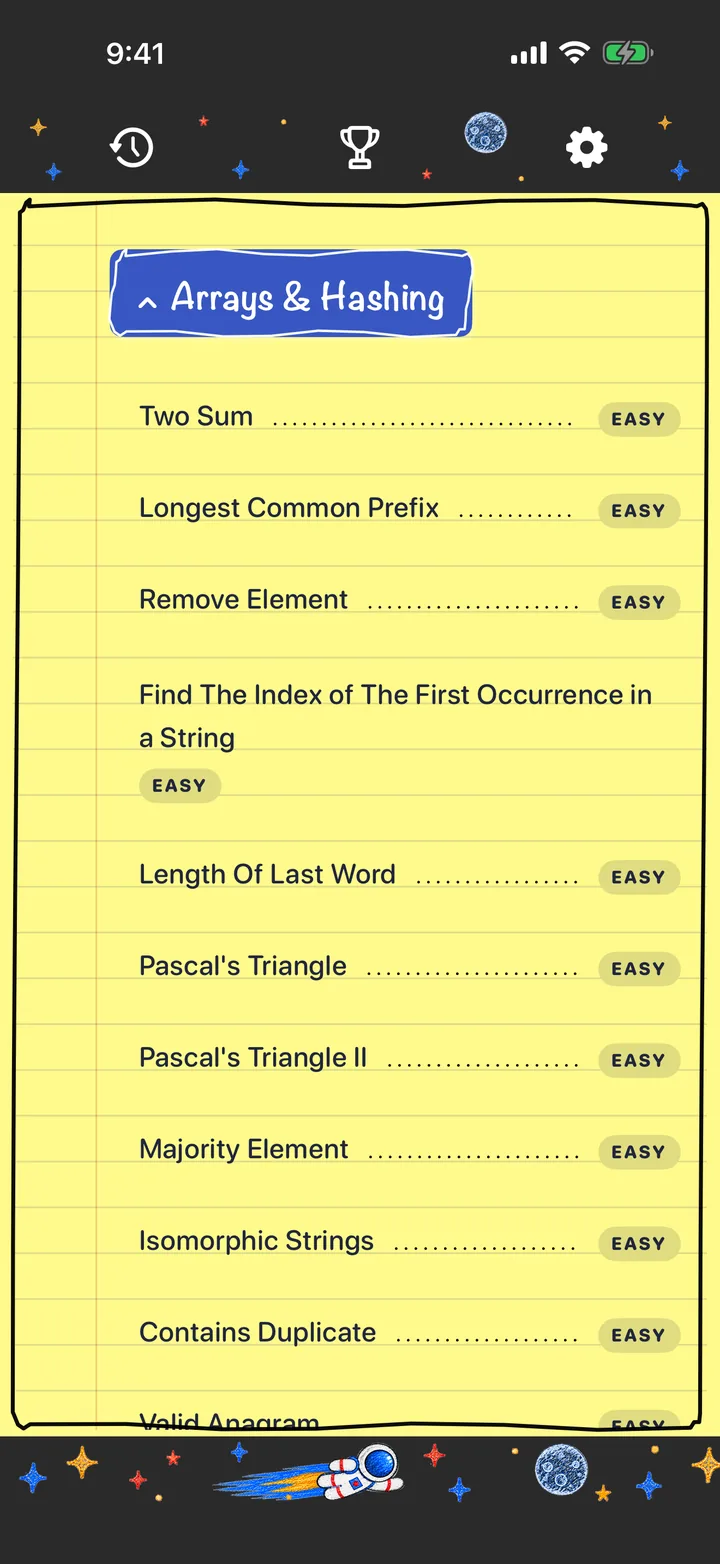
Question list in FAANG Coding Prep, with the Arrays & Hashing category open and difficulty labels for each question

Why FAANG Coding Prep

Everything you need to work toward solving problems on your own.

Interview-style questions, plus a debugger and hints that work on your own code, all on your phone.

The question library

Practice the problems interviews cover.

Hundreds of questions across 18 topics, Easy to Hard.

Work through hundreds of questions grouped by topic, from arrays and hashing to graphs and dynamic programming. Each question comes with clear examples and runs against real test cases.

  • Hundreds of questions across 18 topics
  • Easy, Medium and Hard difficulty levels
  • Worked examples on every question
Two Sum question page with the problem statement, difficulty and a worked example
On your phoneStart with one problem

Free to start · No download · Sign in with Google or Apple

Step-through debugger

Understand where it goes wrong.

Follow your code line by line.

Replay your solution step by step. See each line run, every value change, and the moment a test case fails, so you understand the fix instead of guessing.

  • Step forward and back through your code
  • See values change as each line runs
  • Opens on the first test case you got wrong
The code canvas, where the step-through debugger replays your solution
On your phoneStart with one problem

Free to start · No download · Sign in with Google or Apple

Smart Hints

Feedback on your code.

Smart Hints point to the row that needs attention and explain how to fix it.

Smart Hints read your code and point at the exact row that needs attention, with a short explanation and a suggestion you can apply. A full solution stays hidden until you choose to reveal it.

  • Row-by-row feedback on your own code
  • Swipe to reveal a solution only when you want it
  • Help at the level you choose
Smart Hint feedback explaining a mistake on a specific row, with a swipe to reveal solution control
On your phoneStart with one problem

Free to start · No download · Sign in with Google or Apple

Just the right info

From a small nudge to an explanation.

You choose how much help you get.

Choose how much help you want before you ask, from a gentle nudge to a full walkthrough of where to start. You stay in control of how much you learn by doing.

  • Five hint levels, from a tiny hint to a full start
  • Feedback tied to your current code
  • Learn the pattern, not just the answer
Smart Hint level picker with emoji levels and the mood Am I on track
On your phoneStart with one problem

Free to start · No download · Sign in with Google or Apple

The code canvas

Built for your phone.

Tap to insert loops, conditions and more.

Build solutions with tap-to-insert templates for loops, conditionals, dictionaries and more. Edit any token, and run your code against test cases right on your phone.

  • Ready-made templates for common patterns
  • Run and submit without leaving the app
  • Undo, redo and drafts that save themselves
Two Sum solution on the code canvas, with the for-loop template menu open
On your phoneStart with one problem

Free to start · No download · Sign in with Google or Apple

Your progress

See your progress.

Track what you've solved, by difficulty.

Watch your progress ring fill as you solve questions, see your split across Easy, Medium and Hard, and unlock a new monthly badge as you practice.

  • Progress by difficulty at a glance
  • Monthly badges you unlock by practicing
  • A saved history of your solutions
Trophy screen showing questions solved and progress by difficulty
On your phoneStart with one problem

Free to start · No download · Sign in with Google or Apple

How it works

Practice that fits between everything else.

A few minutes is enough to make progress on today's question.

  1. Pick a question

    Choose a topic and a difficulty that fits where you are today.

  2. Build your solution

    Write your approach on the code canvas and run it against test cases.

  3. Get unstuck, keep going

    Ask for a Smart Hint at the level of help you want, or step through your code to see what went wrong.

FAQ

Questions, answered.

Is FAANG Coding Prep free?

It's free to start in your phone's browser, with free questions. A Pro subscription unlocks the full question library and unlimited Smart Hints.

How do Smart Hints work?

When you ask for a hint, the app sends the selected question, your code and any run errors through our Google Cloud server to OpenAI to generate feedback. Don't include personal or confidential information in your code. AI responses can be incorrect, so treat them as guidance.

Which devices are supported?

Any phone's browser, iPhone or Android. Sign in with Google or Apple and your progress is saved to your account.

How do I delete my account and data?

In the app, open Settings, then Account & Data, and choose Delete account & data. You can also email contact@faangcodingprep.com. See the Data Policy for details.

Who is the app for?

Adults (18+) preparing for software engineering coding interviews who want to practice consistently on their phone.

Is this affiliated with Meta, Apple, Amazon, Netflix or Google?

No. FAANG Coding Prep is an independent app and is not affiliated with, endorsed by or sponsored by any of those companies.
FAANG Coding Prep app icon

Start with one problem today to get closer to landing a high-paying software engineering job.

On your phoneStart with one problem